Best Free Link Tracking Tools for Marketers in 2026
Compare six best free link tracking tools and best URL shorteners on features, pricing and limits, so you can pick the right one for your next marketing campaigns in 2026.
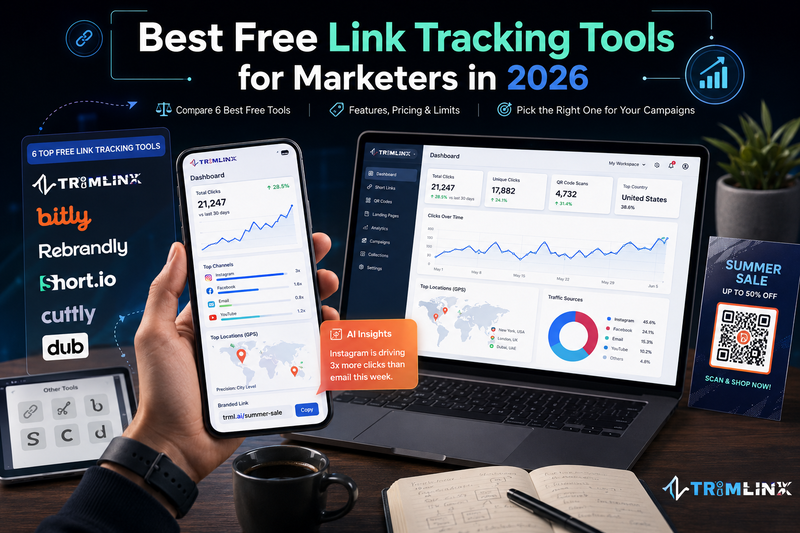

Top 6 Best Free Link Tracking Tools and Best Link Shorteners for Marketers in 2026
You share a link, but what happens after that? Did people actually click it? Which post brought the most visitors or signups? And did anyone scan the QR code on your flyer? Without link tracking, you often have no easy way to know.
A link tracker solves that problem by showing what happens after someone clicks your link. It can tell you things like how many people clicked, when they clicked, what device they used, where the traffic came from, and their approximate location. A URL shortener handles the redirect, while the tracking system turns those clicks into useful data.
The good news is that you do not always need a paid tool to get started. This guide compares six best free link tracking tools that offer free link shortening and tracking: Trimlink, Bitly, Rebrandly, Cutt.ly, Short.io, and Dub. Whether you need a simple free link tracker or a link tracker free option for basic campaign insights, this comparison will help you find the tool that fits your needs without paying upfront.
What is link tracking and what are the benefits of it?
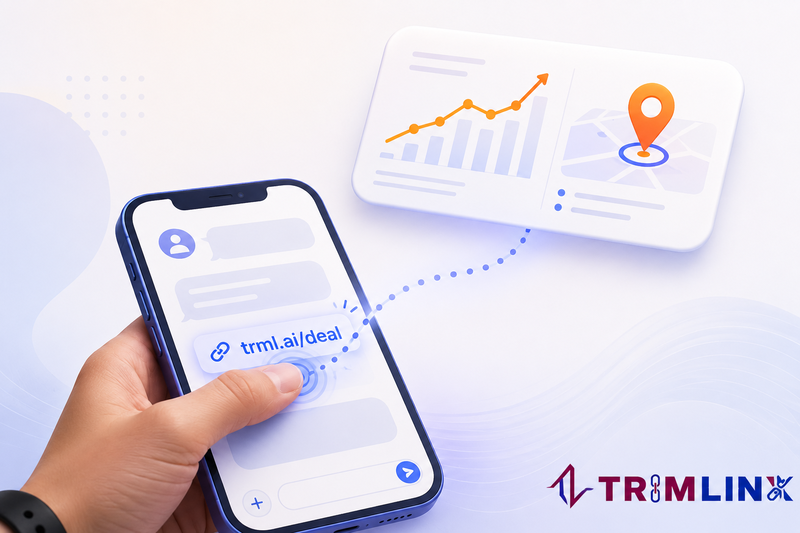
Link tracking means recording what happens after someone clicks your link — not just whether they clicked. A link tracking tool swaps your long URL for a short, trackable link, then logs the click time, device, rough location, and referral source every time it's used. This is what a link tracker does behind the scenes. Many of these tools also support QR code tracking, so offline scans from posters, packaging, or business cards get counted too.
Why It Matters
Without tracking, you're guessing which post, email, or ad actually worked. With it, every link becomes a measurable data point instead of a hunch.
Advantages of using Link Tracking?
Real-time link tracking – See clicks as they happen instead of waiting for weekly reports.
Link analytics – Compare channels side-by-side (Instagram vs. email vs. SMS) to spot what's really converting.
Accurate click tracking – Know not just how many people clicked, but who, where, and when.
Free link tracker options – You don't need a budget to start; plenty of tools offer solid link shortener tracking on a free plan.
Better budget decisions. You can see exactly which channel earns its cost and shift spend toward it.
Faster problem spotting. A sudden drop in clicks on a QR code or print link tells you something broke, often before a single customer complains.
Real audience data. Device type, rough location, and time of day show you when and where your audience actually shows up, not when you assume they do.
Cleaner reporting. Numbers replace guesswork in every update you send to a manager or client.
Easy comparisons. Running two versions of an ad? Two links, two click counts, one clear winner.
Why Link tracking is important for your Business?
Link tracking helps you understand whether your marketing efforts are working. For example, if a client asks how a campaign performed, “People seemed to like it” is not a clear answer. A better answer is: “The campaign received 1,240 clicks, most visitors used mobile devices, and the highest number of clicks came on Tuesday evenings.”
When you share links through ads, social media, email, print materials, or QR codes, click tracking shows how many people clicked, when they clicked, and where they came from.
This makes URL tracking useful for measuring campaign performance and making better marketing decisions. Instead of guessing which channel works best, you can use link analytics to compare traffic, devices, referral sources, and other useful data.
It can also help you spot problems quickly. If a link on a flyer, website, or campaign suddenly stops getting clicks, you can investigate before it affects more visitors. For offline campaigns, QR Code tracking can show whether your QR codes are actually driving traffic.
That’s why link tracking is valuable for businesses of all sizes.
How Link Tracking is Related to URL Shorteners?
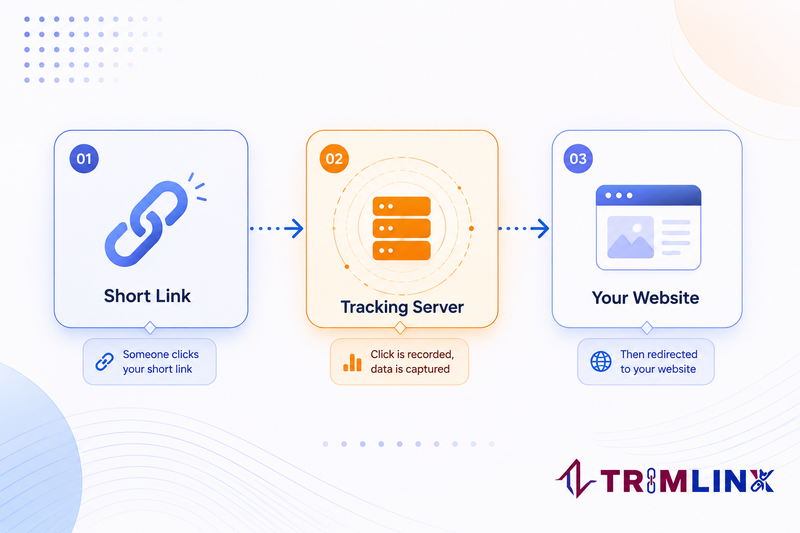
Link tracking and URL shorteners work together. When you create a short link, the short URL does not usually send visitors directly to your destination page. Instead, the click first passes through the URL shortener’s system.
This brief redirect is what makes click tracking possible. The system can record the link click and useful details, such as the time, device, or traffic source, before sending the visitor to the final page.
That is why a URL Shortener Tracker can turn a simple shortened URL into a measurable marketing link. In other words, link shortener tracking happens during the redirect, giving you useful link analytics without changing the experience for the person clicking the link.
Why are URL Shorteners important for tracking links?
A URL shortener makes link tracking easier because every click passes through the short link before reaching the final webpage. You could try to measure clicks without a shortener using pixel tracking, server logs, or analytics scripts, but those methods can get messy fast. Pixels may be blocked, server logs can be difficult to interpret, and webpage-based tracking may not work when a link is shared outside your site. A short link provides one clear tracking point: one link, one destination, and one set of click data.
Unlike tracking methods that depend on a webpage loading, a short link tracker can work wherever the link is shared. You can use URL Tracking in social posts, text messages, emails, business cards, posters, or QR codes. The same link can continue collecting data regardless of where people find it.
This is why a URL Shortener Tracker is useful for measuring click tracking across different channels. Link shortener Tracking connects the shortened URL with the traffic data, making it easier to understand which links are getting engagement and which are not.
How does Link tracking impact your marketing strategy?
Link tracking helps turn everyday clicks into information you can use to improve your marketing. Over time, link analytics may show that weekend posts get more clicks than weekday posts, or that most visitors come from mobile devices. These patterns can help you decide what to post, when to post it, and where to focus your efforts.
For example, click tracking can show which campaign or channel gets the most engagement. This makes performance tracking more useful than relying on personal opinions or assumptions. Some tools also provide real-time tracking, so you can see how a campaign is performing while it is still running.
Instead of asking what might work best, you can look at actual audience behavior and use that data to make smarter marketing decisions.
What Link tracking key features are you look for marketing Campaign
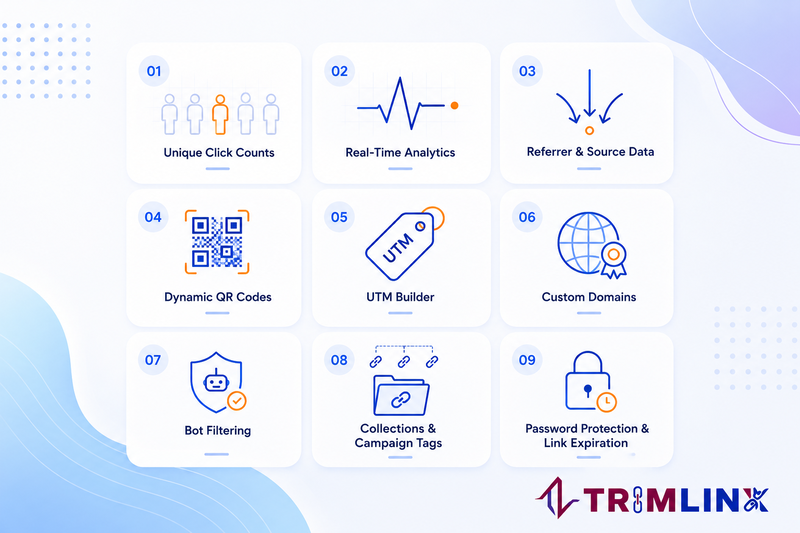
Not every free plan gives you the same toolkit. Before comparing specific products, it helps to know what to actually look for:
Real time analytics, so you see clicks as they happen and notice your audience's actual active hours, not just a total at month end
Unique click counts, so one visitor clicking three times doesn't get counted as three different people
Referrer and source data, showing whether a click came from search, an app, or a direct visit
Location and device data, so you can see where visitors are and whether they use mobile or desktop.
QR code generator built in, so print and digital campaigns share one system
UTM builder, to tag traffic sources without typing parameters by hand
Conversion tracking, so you can connect a link click to actions such as signups or purchases.
Branded domains, so tracked links look trustworthy and consistent with your brand.
Bot filtering, to keep fake or automated clicks out of your numbers
Password protection and link expiration, for anything time sensitive or private
Collections or campaign tags, to see a whole batch of links perform together instead of checking ten separately
Data export or API access, so campaign results can be reported or analyzed elsewhere.
A usable free tier, since most small campaigns shouldn't need a credit card just to start
Keep this list nearby. It's the same one used to compare the six tools below.
6 best free link tracking tools and URL shorteners for marketing campaigns in 2026
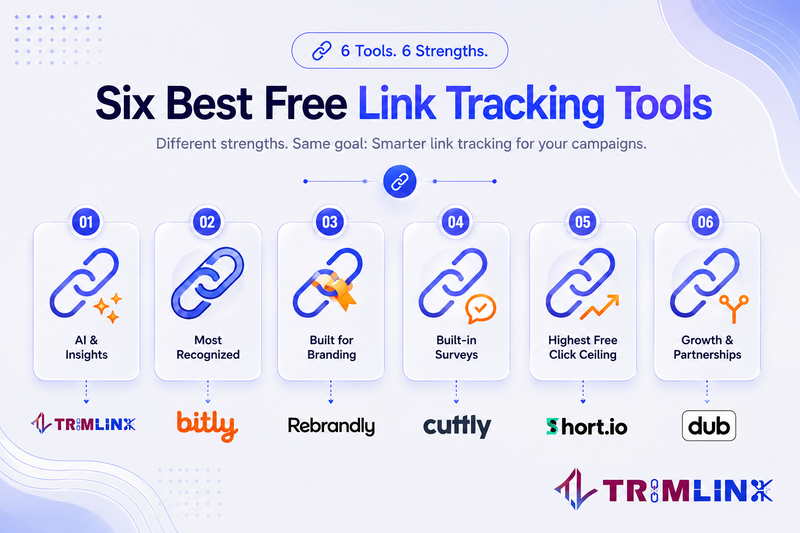
The best free link tracking tools help marketers measure clicks, traffic sources, and campaign performance without paying upfront. At the same time, Best free url shorteners make long URLs easier to share and can add useful tracking features. A free URL tracker is especially helpful for comparing social posts, emails, ads, and QR campaigns. We compare six popular tools based on free limits, tracking features, QR codes, custom domains, analytics history, and what happens when your campaign grows.
Trimlink
Overview: Trimlink is an AI-assisted link management and QR platform built by Trignoweb, designed less like a stripped-down trial and more like a complete marketing toolkit you can start using for free. For a marketer, that matters because most competitors ration their best analytics behind a paywall, while Trimlink puts GPS location tracking, Real Map View, bot detection, Short Link collection, Workspace, AI-generated performance insights, AI Landing Pages and AI generated bios and full customized QR codes on the free plan itself. You can also use it as a free tracking link generator to create tracking links for local promotions, print campaigns, and multi-channel launches. That combination makes it a genuinely capable best link tracking option for anyone who wants real data before committing budget to a paid tool, and a solid URL shortener choice for building trust with a branded link on every post.
Key features: Four groups of features do the most for a marketing campaign. Unlimited QR codes and GPS location tracking cover the offline side: unlimited customizable QR codes for print and events, plus 30 free GPS lookups a month for street-level accuracy in local promotions. AI does the busywork online: AI Insights turns click data into plain-language suggestions, and the AI landing page builder turns a short link into a campaign page or a link-in-bio style hub, restyled by chatting with the built-in editor instead of coding one from scratch. Custom domains also let you create a branded short domain, so every shared link reinforces your brand instead of relying on a generic URL. Collections keep a whole campaign's links organized in one view, and tags make each one easy to find by channel later. On the safety side, content-safety AI scanning checks every destination and blocks links that look suspicious or match known phishing and malware patterns, while an unlimited IP and geolocation list gives you the detailed record, country, device, network, behind every click, all free. Two more essentials round it out: a built-in UTM builder and unlimited custom aliases keep every link properly tagged and readable without extra tools. making Trimlink a strong best link shortener for campaign management.
Pros: The free plan includes GPS tracking credits and AI Insights, features most competitors save for paid tiers. Real per-click analytics on the free plan, not a bare link counter, covering referrer, device, and location data from day one. Custom aliases and link expiry control are unlimited even on Free.
Cons: Free is capped at 100 new short links and 1,000 tracked clicks a month. Public link and password pages carry Trimlink branding until you upgrade.
Pricing: Free costs nothing and includes real analytics from day one. Pro raises the monthly link and GPS limits and removes Trimlink branding from your pages. Bulk goes further, with more domains, higher click limits, and room for a bigger team. Enterprise pricing is negotiated directly.
Best for: Marketers who want AI Landing Pages, AI-generated insights, and GPS Tracking, Bot filtering, unlimited QR code and UTM Links without paying for a plan first.
Bitly
Overview: Bitly is the name most marketers think of first when they hear "link shortener," and it has spent that recognition building out a broader connections platform rather than staying a simple redirect tool. Bitly Assist, its AI layer, can generate and analyze links inside the same dashboard, which suits marketers who want quick suggestions without switching tools mid-campaign. Where Bitly earns its reputation as a dependable link tracking software is consistency: clicks and QR scans are unlimited on every plan, including Free, so a small campaign never gets throttled mid-flight the way it might on stingier competitors. The trade-off for that brand trust is a tighter free allowance on link creation itself.
Key features: For marketing teams, Bitly's strongest features center on scale and polish rather than raw generosity. Branded links and custom landing pages, available from the Growth plan up, let a campaign send every click to a page built specifically for that promotion instead of a generic destination, which tends to lift click-through rates because the link visibly matches the brand doing the promoting. Mobile deep linking on the higher tiers sends app users straight into a specific screen instead of a browser tab, a meaningful detail for any campaign that lives partly inside a mobile app. Bitly Assist's AI link creation speeds up the busywork of naming and organizing links across a large campaign calendar, while the browser extension and mobile app mean a marketer can shorten and check a link's performance without opening a laptop first. The catch for a marketing-purpose free plan is volume: 5 links and 2 QR codes a month rules Bitly's free tier out for anything beyond a very small test, and custom domains, the single biggest trust signal on a shortened link, don't appear until the Growth plan.
Pros: Strong brand recognition, browser extensions, a mobile app, and unlimited clicks and scans on every plan, including Free.
Cons: The Free plan allows just 5 links and 2 QR codes a month, with no custom domain until the Growth plan and no link expiration on Free.
Pricing: Free, then Core ($10/month, annual billing only), Growth (around $29 to $35/month), Premium, and a custom Enterprise plan.
Best for: Teams that already know the Bitly name and only need a handful of tracked links each month.
Rebrandly
Overview: Rebrandly leans into branding harder than any other tool on this list, built around the idea that a link should look like it belongs to you from the very first click. Where most free plans hold custom domains back as a paid upgrade, Rebrandly hands you a custom domain on its Free plan, alongside a free rebrand.ly domain as a fallback, making it a strong branded URL shortener for a marketer who cares about first impressions more than volume. Its link galleries function as a lightweight link-in-bio page, useful for social bios and email signatures, and AI scheduling suggestions on paid tiers help time posts around when clicks actually happen.
Key features: The marketing case for Rebrandly rests mostly on trust and organization. A custom domain from day one means every link in a campaign, whether it's an email, a social post, or a paid ad, carries the same brand instead of a shared generic domain, which matters when audience trust affects click-through rates. Custom back-half text, the part after the domain, is generous at every tier, so a link can read as /springlaunch instead of a random string, keeping printed and spoken links memorable. Link galleries group related links into a single shareable page, functioning as a simple landing spot for a bio link or a resource hub without building a separate website. On paid tiers, conversion tracking connects a click to a completed signup or sale rather than stopping at the click itself, and AI scheduling suggestions flag the times a specific audience tends to engage. The free plan's real limit for marketing use is data depth: engagement tracking stops at 100 clicks a month, so real traffic will need an upgrade to see the full picture.
Pros: A custom domain is included from the Free plan itself, which is unusual among competitors. Back-half customization is generous at every tier.
Cons: Free caps engagement data at 100 clicks a month, so detailed analytics disappear quickly. Bulk import isn't available until the Professional plan.
Pricing: Free, then Essentials (around $8 to $11/month), Professional, and Growth (up to about $99/month), plus custom Enterprise and volume-based plans.
Best for: Brands that want their own domain on every link from day one, even before paying anything.
Cutt.ly
Overview: Cutt.ly positions itself as an all-in-one marketing toolkit rather than a single-purpose shortener, bundling surveys and simple landing pages, called Action Pages, in with its link tracking. That bundling makes it a practical URL shortener tracker for a marketer who wants basic lead capture alongside click data without paying for three separate subscriptions. Cutt.ly also builds in TRAI-compliant tracking headers for SMS campaigns, a specific and useful detail for teams marketing to audiences in India, where SMS regulation affects how links can be sent. For a straightforward click-counting free Link shortener with a couple of bonus tools layered on top, it is a reasonable starting point.
Key features: Cutt.ly offers several features that can be useful for marketing campaigns. Its survey tool lets you collect feedback or lead information from visitors without using a separate form tool. Action Pages can also work as a simple link-in-bio page, allowing one link to promote multiple offers. Another advantage is unlimited clicks, so even a campaign that suddenly gets heavy traffic will not hit a monthly click cap. Cutt.ly also includes a UTM generator, making it easier to tag campaign traffic and keep attribution consistent. For marketers targeting India, its TRAI-compliant SMS headers can be useful for SMS campaigns. However, the free plan has some limitations. Password protection and link expiration are unavailable on Free, so time-sensitive or restricted campaigns require a paid plan.
Pros: Unlimited link clicks on every tier, including Free. UTM building and QR codes are included from the start.
Cons: Free QR codes come in one fixed style only. Password protection and link expiration are locked behind the Single plan.
Pricing: Free, then Starter ($12/month), Single ($25/month), Team ($99/month), and Team Enterprise ($149/month), each cheaper on annual billing.
Best for: Teams in India running SMS campaigns, or anyone who wants surveys bundled in with their links.
Short.io
Overview: Short.io reads like a tool built by developers for other developers first, and marketers second, which shows up as an unusually generous free click allowance rather than marketing-specific extras. Fifty thousand tracked clicks a month on the free plan puts it well ahead of every other free Link tracker on this list, useful for a marketing team running a high-traffic campaign without wanting to pay before proving the concept works. Five custom domains on Free is also unusual generosity, letting a team split links across a few different brands or sub-campaigns without upgrading. The trade-off is a plainer feature set: no password protection, link expiration, or audience targeting until you pay.
Key features: For marketing, Short.io’s biggest advantage is volume: its Free plan supports 50,000 tracked clicks per month, making it suitable for high-traffic campaigns that might exceed other free limits. Commercial use is also allowed, which is useful for businesses and agencies. You can add five custom domains for free, helping teams manage links for multiple brands or clients. Short.io also includes an AI assistant that can help create link names and basic copy, although its monthly usage is limited. The main catch is link creation: the Free plan includes 1,000 branded links as a lifetime limit, not a monthly allowance, so frequent campaigns can use them quickly. Country and region targeting, password protection and link expiration require a paid plan. Marketers needing these controls should consider the upgrade cost before relying on them for campaigns.
Pros: 50,000 tracked clicks a month on the free plan alone, among the highest of any tool here, with commercial use explicitly allowed on Free.
Cons: Country and region targeting, password protection, and link expiration all sit behind paid plans. The free link allowance is a one-time lifetime total, not a monthly refill.
Pricing: Free, then Hobby ($5/month), Pro ($18/month), Team ($48/month), and Enterprise ($148/month).
Best for: Developers and technical teams who want a high click ceiling on Free and don't mind working through a detailed plan table.
Dub.co
Overview: Dub is the newest platform on this list, built API-first for teams that expect to outgrow a basic shortener and eventually run affiliate or partner programs alongside plain marketing links. It calls its own free plan the most generous on the market, and the specifics mostly support that claim: an AI assistant, API access, and UTM templates all ship free, features several competitors reserve for paid tiers. For a marketing team specifically, Dub works as a best link tracking tool chosen with room to grow in mind rather than one picked purely for today's campaign size, since its higher tiers lean toward partner and affiliate tracking that a small team may not need yet.
Key features: Dub is better suited to teams that use links as part of a broader growth or partnership strategy rather than simply shortening links for social posts. Deep linking can send mobile users directly into an app, which is useful for campaigns focused on app installs or in-app actions. Link cloaking hides the destination URL, which can be useful for affiliate-style promotions where long or unfamiliar links may reduce trust. The Free plan also includes three custom domains, allowing marketers to separate links by brand or campaign. UTM templates help teams keep campaign source and medium naming consistent, while API access lets technical users automate link creation instead of making every link manually. The main limitation is volume. The Free plan allows 25 new links and 1,000 tracked events per month, making it suitable for testing or smaller campaigns rather than a busy long-term marketing schedule.
Pros: Dub calls its free plan the most generous on the market, and the specifics back that up, with API access and UTM templates included at no cost.
Cons: Only 25 new links and 1,000 tracked events a month on Free. Higher tiers lean toward affiliate program management, which solo marketers may not need.
Pricing: Free, then Pro ($30/month), Business ($90/month), Advanced ($300/month), and a custom Enterprise plan.
Best for: Startups that expect to run an affiliate or partner program later and want one platform for both jobs.
How to Implement Link tracking for your campaigns?
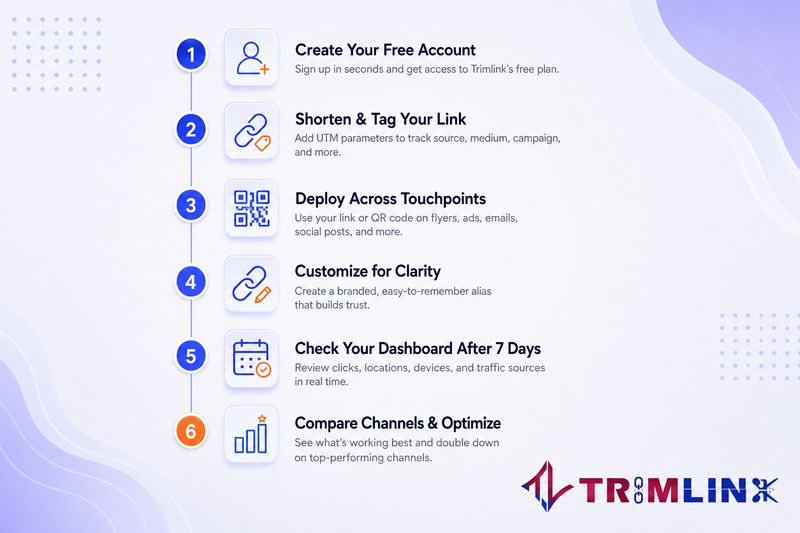
Getting started takes less time than picking which tool to use.
Pick one tool from the list above and create a free account.
Shorten your first link and turn on UTM tagging if you plan to run the same content across more than one channel.
If you have a physical touchpoint, a poster, packaging, or a menu, generate a QR code pointing to that same tracked link.
Set a custom alias so the link reads clearly, like /summersale instead of a random string of characters.
Check your dashboard after the first week, not the first day. Early numbers are noisy; a week gives you an actual pattern.
Compare channels against each other, not against a number you imagined beforehand.
That's the entire setup. Everything after this is just repeating it for your next campaign.
How to choose Right Link tracking tool and url shortener for marketing campaign?
Choosing the right link tracking tool and URL shortener starts with understanding how you plan to use it. First, estimate how many links and clicks your campaigns will generate each month. A solo marketer may need only a few links, while an agency running multiple campaigns may need much higher limits.
Next, consider whether your team needs to work together. If several people create or edit links, check for workspaces, user permissions, and access control, not just click limits. If you are looking for link tracking free options, compare whether the free plan includes the collaboration features your team actually needs.
Finally, check how long the tool keeps your link analytics and click history. Some free plans limit historical data, which can make it difficult to compare campaigns months later. Features such as UTM Campaign Tracking, real-time analytics, QR Code tracking, and custom domains may also matter depending on your campaign. For smaller campaigns, free tracking links can be a practical way to measure clicks without committing to a paid plan.
The best choice is the tool whose free limits and features match your actual marketing needs, rather than simply offering the most features.
Why Trimlink is best link tracking option for marketers?
Trimlink isn't the biggest name on this list. Bitly has that reputation locked in. But its free plan is unusually complete for a first-time user. Most tools ration their best features for paying customers. Trimlink gives away dynamic QR code generation, GPS-precision location tracking credits, and AI Insights on link performance before you ever add a card.
That combination matters most for two kinds of marketers. If you run local or event campaigns, the free GPS location tracking credits (30 a month) show street-level click locations that most competitors charge for outright. And if you're not confident reading raw link analytics yet, AI Insights turns your click data into plain-language suggestions instead of a wall of numbers you have to interpret yourself.
The trade-off is volume: 100 links and 1,000 tracked clicks a month on Free suit a small campaign, not a large one. That makes it one of the best url shorteners for marketing campaigns for anyone at that scale, not the biggest tool on the list, just a genuinely capable one for what it costs. For marketers who fit that size and want more than a bare-bones shortener, Trimlink is worth the signup.
Frequently Asked Questions
Is link tracking data private, or can anyone see my clicks? By default, your click data stays private to your account. Some tools let you make individual link stats public if you want to share performance openly, but that's always opt-in, never automatic.
Can I use a free link tracker for a real business, or only personal links? It depends on the provider, so check before building a campaign around it. Short.io states plainly that commercial use is fine on its free plan. Others do not spell it out publicly, so a quick read of the terms page saves a headache later.
Is a link shortener useful if I only need click tracking? Yes. A URL shortener can act as a simple URL tracker by creating a short, shareable link that records activity before sending visitors to the destination. This is especially useful when you need to measure clicks from channels where you cannot easily add your own tracking system. A dedicated link tracking service becomes even more useful when it combines link shortening with UTM tracking, real-time analytics, QR Code tracking, and campaign reporting.
Which URL shortener is best for tracking clicks and analytics? The best option depends on how much link analytics you need from a free plan. A useful link tracking tool should show more than a total click count, including traffic sources, devices, locations, referrers, and trends over time. For marketers, features such as real-time analytics, UTM Tracking, QR Code tracking, and bot filtering can make the data much more useful for measuring campaign performance.
What are the best tools for tracking link clicks and viewer engagement? For basic click tracking, a free URL tracker can show how often people open a link and where that traffic comes from. For deeper engagement analysis, look for tools that connect link clicks with UTM parameters, landing pages, or conversion data. This is where link analytics becomes more useful than simply counting clicks, especially when you are measuring digital marketing or performance marketing
How does URL tracking help measure campaign performance? URL Tracking lets you connect each link click to a specific campaign, channel, or traffic source. Using an UTM Tag Builder, you can label links with values such as source, medium, and campaign name. This makes it easier to compare traffic from email, social media, paid campaigns, QR codes, and other channels and see which ones are producing the strongest results.
Is link tracking the same thing as a URL shortener? Not exactly. A URL shortener's core job is making a link shorter. Link tracking is the data layer riding on top of that, logging each click before the redirect happens. Most tools worth using today do both together, but they are separate ideas, and it helps to know which one you actually need.
Read the full article here: 6 Best Free Link Tracking Tools 2026 (URL Shorteners Compared)

Comments
No comments yet. Be the first to comment!