

5 Best Free URL Shorteners 2026 (with Criteria Comparison)
5 Best Free URL Shorteners 2026
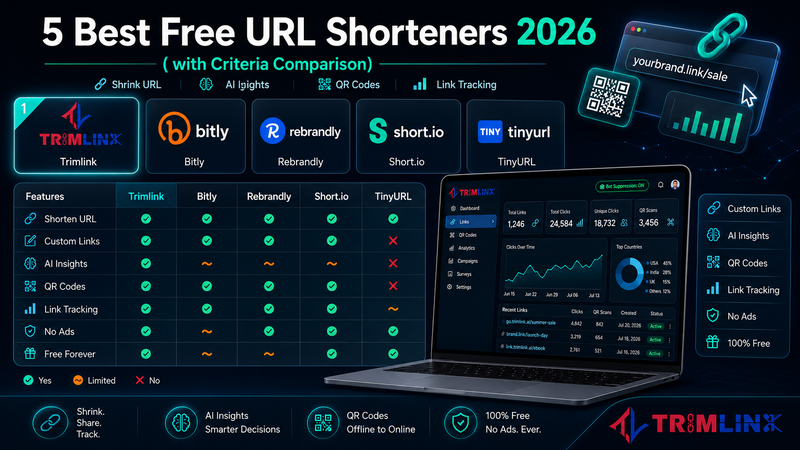

The Complete Guide to Free URL Shorteners in 2026
Choosing a free link shortener in 2026 is harder than it should be. Dozens of tools offer the same basic thing, but the experience they deliver is very different. Some place a full screen ad between your link and your audience. Some cap the free plan so tightly that you hit the limit within a week. Some give you no analytics at all so you never know if anyone clicked.
We tested five of the most best free Link Shortener tools in this space: Trimlink, Bitly, Rebrandly, Short.io, and TinyURL. Below you will find answers to the questions most people have before picking a platform, along with a detailed comparison of what each tool actually offers.
What Is a URL Shortener? How Do Short URLs Work?
A URL shortener is a service that converts a long web address into a shorter one that redirects to the same destination. When someone clicks the short link, the service reads it and immediately forwards the visitor to the original page. The process takes a fraction of a second and is completely invisible to the person clicking.
These shorter addresses go by several names: a short URL, a short link, a trim URL, a tiny link, or simply a shortened URL. All of these describe the same thing. The short address is hosted by the platform you use, which is why the domain in the link belongs to that platform unless you connect your own custom domain.
What makes modern tools useful beyond the basic redirect is what happens at the moment of each click. Location, device type, referral source, and timing are recorded and shown in a dashboard. This is what turns a simple redirect service into a genuine link tracking tool for marketers and businesses.
Why Should You Shorten a URL? Benefits of Creating Short Links
There are good reasons to shorten a URL even for users who are not focused on analytics or branding.
Clean presentation is the most immediate benefit. Long web addresses with tracking parameters and session tokens look unprofessional in social media captions, email newsletters, SMS messages, and printed materials. A short, readable link fits neatly, is easier to copy correctly, and looks more trustworthy to the person seeing it.
Measurement is the next benefit. When you shorten a URL, every click generates data about who clicked, when they clicked, and where they came from. This turns every link you share into a source of feedback about your content and audience.
Flexibility rounds out the case for creating short links. Because a shortened website link is a redirect, you can change the destination at any time without changing the address itself. If a product page is updated or a campaign ends, you update the target in your dashboard and the existing link continues to work. A long static URL cannot do this.
How to Create a Shorter URL and Where to Shorten Links
Creating a shorter URL is straightforward and takes about thirty seconds.
Open a free short URL generator. Paste your long URL into the input field. Click the shorten button. Copy the result and share it wherever you need.
For the fastest option with no account: TinyURL. You paste a URL, get a short link immediately, and the link never expires. No registration, no setup.
For options with analytics, custom link names, and QR codes: Bitly, Rebrandly, Short.io, and Trimlink all offer free accounts. Registration is fast and gives you features that a service without an account cannot provide, including click tracking, custom aliases, and QR Code generator access.
For shortening a large number of URLs at once, look for a platform with a bulk URL shortener or CSV import feature. This lets you process dozens or hundreds of links in a single step rather than shortening them one at a time. This is especially useful for ecommerce teams and agencies managing large campaign sets.
How Can I Create a Custom Short Link and How to Customize Short Link
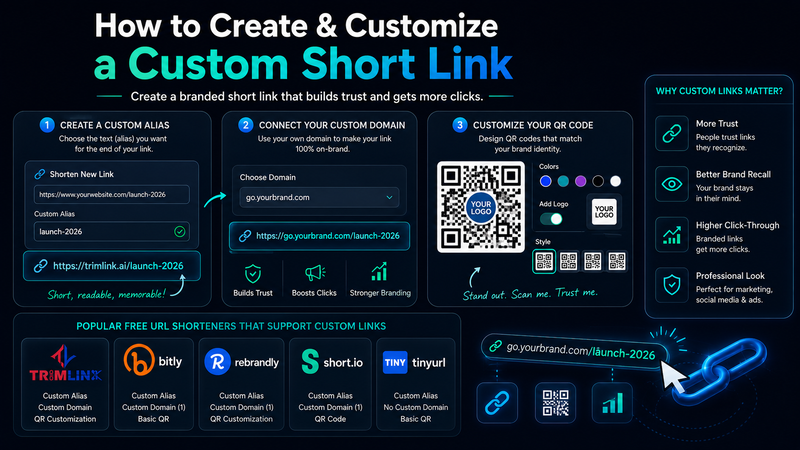
A custom short link is one where you choose the text at the end of the address. Instead of a random string, you create something like /launch-2026 or /offer. This readable text is called a custom alias or custom slug.
Most free link shorteners let you set a custom alias when you create a link. TinyURL allows this without an account from the homepage. Bitly and Rebrandly include it when you are signed in on the free plan.
Customization goes further than just the alias. The next step is connecting your own custom domain so the full address reads as go.yourbrand.com/offer rather than a platform shared domain. This is what link branding means in practice. It changes whether a person recognizes the link as yours before they tap it.
QR code customization is another layer. Some platforms let you adjust QR colors, add a logo in the center, and choose different visual styles. This makes QR codes match your brand rather than looking generic. Free plans vary significantly in how much QR customization they include, so it is worth checking before committing to a platform.
Compare the 5 Best free URL Shotener Platforms on Parameters: Features, Free Plans, and Pricing
Here is a direct comparison of what each tool gives you at no cost and what paid plans unlock.
Trimlink (trimlink.ai) Best free plan for complete features across analytics, AI tools, and compliance
Free plan includes: 100 short links per month, unlimited QR code generation with full logo and color customization, 1 custom domain, unlimited custom aliases, 1,000 tracked clicks per month, GPS tracking (30 credits per month), 2 AI landing page templates per month, UTM Builder, bot filtering, survey forms on landing pages, team collaboration with role based Access Control, and API access at 10 requests per minute. All plans include SOC 2 Type I certification, GDPR compliance, CCPA compliance, and a 99.99% uptime SLA.
Paid plans: Pro at $19 per month (or $17.08 per month billed annually at $205 per year) for 1,500 links, 5 domains, 10,000 tracked clicks, and 500 GPS credits. Bulk at $49 per month (or $44.08 per month billed annually at $529 per year) for 5,000 links, 10 domains, 50,000 clicks, 1,500 GPS credits, and bulk import of up to 10,000 links. Enterprise is custom.
Bitly (bitly.com) Most globally recognized short domain with a strong integration ecosystem
Free plan includes: Approximately 10 short links per month, basic click analytics, no custom domain, limited QR access. The bit.ly domain carries 15 years of public trust, which helps with click through rates on publicly shared links. Bitly connects with over 55 platforms including HubSpot and Zapier.
Paid plans: Core at approximately $10 per month, Growth at approximately $35 per month for deeper analytics and more links, Premium at approximately $199 per month for high volume use. Enterprise is custom.
Rebrandly (rebrandly.com) Built for agencies that manage multiple branded domains
Free plan includes: Approximately 5 branded links per month, 1 custom domain, basic analytics. No bot filtering, no AI features, no GPS analytics. Rebrandly's paid plans include link retargeting, which adds advertising pixels to all links in a workspace so every person who clicks gets added to a retargeting audience.
Paid plans: Lite at approximately $13 per month, Professional at approximately $32 per month with multiple domains and retargeting, Scale at approximately $69 per month and above. Agency pricing escalates significantly for multiple domain setups.
Short.io (short.io) Designed for developers who need API access and geographic routing
Free plan includes: 5 custom domains, 50,000 tracked clicks per month, geographic targeting, device based routing to different destinations. Note: the free plan has a lifetime cap of 1,000 total branded links, not a monthly allowance. The Link Shortener API is well documented and flexible for developers building link management into their own products.
Paid plans: Hobby at $5 per month, Pro at $18 per month with unlimited links and clicks, Team at $48 per month with city level targeting and full data encryption, Enterprise at $148 per month.
TinyURL (tinyurl.com) Fastest option for a permanent link with no account required
Free plan includes: Unlimited short links, free custom back half from the homepage, no account required, links never expire. No analytics, no custom domain, no QR codes at the free tier. The shared tinyurl.com domain has been flagged by some corporate email filters and spam detection tools due to historical misuse by other users on the same platform.
Paid plans: Pro at $9.99 per month adds analytics, QR codes, and branded domain support. Team plans start at approximately $29 per month.
Have You Ever Tried Using a Link Shortener for Your Business? How Did It Go?
Most people who start using a short link generator for business work quickly notice that the data changes how they make decisions.
When you tag every link with UTM Source Builder parameters and track them in one place, your analytics stops reporting total traffic and starts breaking it down by source, medium, and campaign. A piece of content shared across three platforms stops looking like a single result and becomes three separate data streams you can compare.
Team use adds another dimension. Platforms with workspaces and group management allow different organization members to create and monitor links within separate areas of the same account. Role management and Access Control mean you can give team members the access they need without giving everyone full administrator permissions.
The businesses that get the most from these tools are typically the ones that establish UTM tracking and link organization habits early rather than trying to add structure after campaigns are already underway.
How Do You Feel About the Analytics Provided by URL Shorteners? Are They Helpful?
The analytics in these tools are the most underestimated feature for new users and the most valued feature for experienced ones.
At the basic level, most platforms show total click counts broken down by day, country, and device type. This is useful but limited. It tells you that people clicked, but not much about the quality of the engagement.
Tools that go further offer real time analytics showing clicks as they happen, GPS tracking for precise location data beyond country level, and live analytics dashboards during active campaigns. AI Insights features on some platforms read across your link data and surface meaningful patterns automatically instead of requiring you to interpret raw numbers.
The critical variable across all these tools is bot traffic. When web crawlers and automated scripts visit your links, they inflate click counts. Without bot filtering, you cannot be certain what proportion of your reported traffic came from actual people. This makes the data less useful for any decision that depends on accurate audience behavior.
What's Your Opinion on the Security of Free Link Shorteners? Are You Concerned?
The concern is reasonable and specific rather than vague.
The most practical issue is the shared domain problem. When a platform allows anyone to create short links under the same domain, misuse by others can lead spam filters and corporate email systems to flag or block that entire domain. Businesses with professional audiences who rely on email deliverability often find that branded custom domains are not optional for this reason.
Destination scanning is a separate question. Does the platform check the page you are pointing to for malware or phishing content before building the short link? Platforms that scan destinations protect your audience from being redirected somewhere harmful. Those that do not pass responsibility entirely to the link creator.
Data compliance matters for any business operating internationally. Platforms with documented GDPR and CCPA compliance tell you exactly what data is collected from visitors, how it is stored, and how long it is kept. For businesses with customers in Europe or California, this is a legal requirement rather than a preference.
If You Could Design Your Ideal URL Shortener, What Features Would It Have?
This question tends to produce the same cluster of answers from people who use these tools regularly.
A free plan that is genuinely useful comes first. Most people want to test a platform properly before committing to a paid tier, and a plan capped at five or ten links per month does not allow that.
Real analytics with bot filtering comes second. Click data that has not been cleaned of automated traffic is not reliable enough to base decisions on.
An AI landing page builder is consistently mentioned by marketers and content creators. The ability to attach an AI-generated hosted page to a short link, and update it using an AI chat interface, replaces the need for a separate landing page tool.
Team management tools appear on almost every wishlist: workspaces with separate areas for different projects or clients, group links for organizing campaign URLs, and granular permission management that lets different organization members access only what they should.
Compliance credentials round out the ideal: GDPR and CCPA by default, destination scanning for every link, and a clear uptime guarantee so links never break during active campaigns.
How Do You Feel About Using URL Shorteners for Personal vs. Business Purposes?
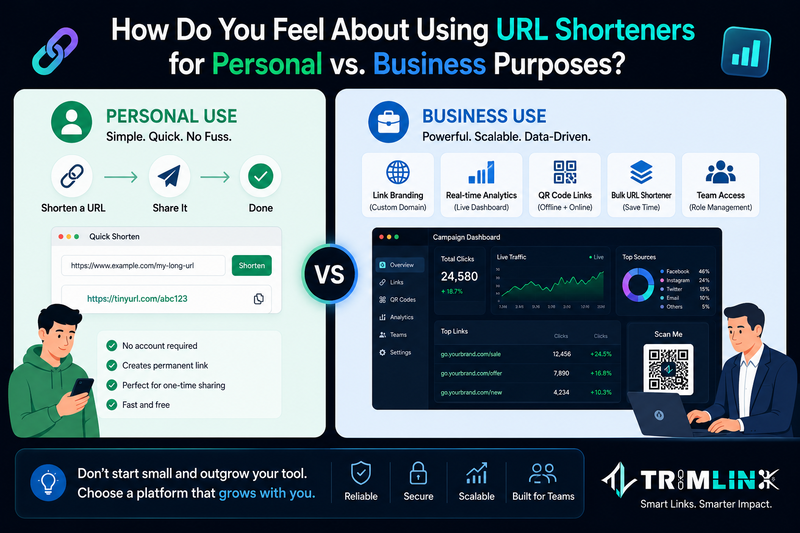
Personal use and business use involve completely different requirements, and the gap between them is larger than most people expect before they try to bridge it.
For personal use, the requirements are minimal. You need to shorten a URL quickly, share it once, and move on. A free tool that requires no account and creates a permanent link in seconds is all you need.
For business use, the list grows substantially. You need link branding with a custom domain so your audience recognizes who the link belongs to. You need a real time traffic dashboard so you know how campaigns are performing. You need a QR code link for offline materials that ties back to the same dashboard as your digital traffic. You need a Bulk URL Shortener for large volume campaign work. And you need team access with proper role management.
The mistake many businesses make is starting with a tool designed for personal use and trying to scale it. The limitations surface quickly and migrating links in the middle of a campaign creates unnecessary problems. Choosing a platform that handles both from the beginning is the simpler path.
Have You Ever Used a Short Link Generator to Track Engagement? What Did You Learn?
Using a Short Link Generator with analytics consistently produces three realizations that change how people approach link sharing.
The first is timing patterns. Different platforms have entirely different click distributions. Links in email newsletters typically spike within the first two hours and taper slowly over a week. Links on Instagram Stories get almost all their clicks in the first few hours before the story expires. LinkedIn posts continue generating clicks for 24 to 48 hours after publication. Knowing this by platform makes scheduling future content significantly easier.
The second is device distribution. Seeing that 75 to 80 percent of clicks come from mobile devices when the destination page is not optimized for mobile use is data that motivates immediate action in a way that general website analytics does not.
The third is channel comparison through UTM tracking. People who use a UTM Tag Builder to create separate tagged versions of the same link for each platform consistently report that their assumptions about which channel performed best were wrong. The data often reveals a different picture than gut feeling predicted.
What's Your Biggest Challenge When Using Custom Link Shorteners?
Several recurring challenges come up when people who actively use custom link shorteners discuss what makes them frustrating.
Organizing links at scale is the most common. As campaign volumes grow and link counts reach the hundreds or thousands, finding a specific link, grouping related links by campaign, and viewing combined performance data across a set of URLs all become harder. Platforms with manage collections features or group links functionality solve this by letting you cluster related links and view their aggregate data.
Custom domain setup is the second challenge. Connecting your own domain requires DNS configuration, which is unfamiliar to users without technical experience. The setup process is documented in most platforms but the clarity and speed varies significantly. Some platforms walk you through it in ten minutes. Others require reading technical documentation.
Team permission management is the third. When organization members need different levels of access to the same account, platforms without proper role management force teams into sharing a single login or giving everyone full access. Both of these create problems for accountability and accidental changes. A proper permission management system with defined roles prevents both.
Read the Full Comparison
This teaser covers the foundations. The full article goes deeper with a direct feature comparison table, detailed pricing analysis for all five platforms, an honest look at which tools show ads during the redirect and which ones do not, and a buying guide that matches each tool to the right use case.
If you want a clear answer before signing up anywhere, the complete comparison is worth the read.
Read the full article here: 5 Best Free URL Shorteners in 2026 (No Ads, Custom Links)

Comments
No comments yet. Be the first to comment!